How I Built This Thing (Part 2) - Objects
World of Spells, Part II
Objects: Rendering, Sorting, and Surviving on a ZX Spectrum
Walls are easy.
They don’t move.
They don’t overlap.
They don’t shoot back.
Objects are where everything breaks.
Ghosts move, fireballs bounce, treasures float, dragons breathe fire. They can overlap, intersect rays, hide behind walls, and suddenly demand correct ordering — all on a machine that barely tolerates drawing static geometry.
In World of Spells, objects are not a feature layered on top of the engine.
They are a constant performance threat that has to be carefully contained.
The Hard Limits
Before talking about implementation, let’s state the constraints:
-
Maximum 17 objects
-
15 bytes per object:
-
Single 256-byte page: 17*15 = 255 bytes.
-
No dynamic memory allocation
-
Objects may move every frame
-
Sorting must run every frame
-
Rendering must not explode CPU time
Those numbers are not arbitrary.
They come from one rule:
Object management must never steal time from the raycaster.
If object logic becomes unpredictable, the whole engine collapses.
The Object Collection: Fixed, Brutal, Predictable
The object collection is a flat array:
-
17 slots
-
Each slot is exactly 15 bytes
-
Free slots are allowed, but always drift toward the end
There is no linked list.
No malloc.
No clever indirection.
Adding an object means scanning for a free slot.
Removing one means marking it free and letting the sorter clean it up later.
This simplicity is deliberate. It makes object iteration fast, cache-friendly, and predictable — which matters more than elegance.
The Object Data
15 bytes is for:
-
Object type: 1 byte
-
Position x and y: 4 bytes.
Speed x and y: 2 bytes (even if some objects does not move, it's here)
Position on map: 1 byte. It could be calculated from position, but it is cheaper to update it only when object moves across map
Position on screen - x and y - 2 bytes
Distance from player: 1 byte (used for sorting)
And 4 bytes that depends on object:
- Acceleration x and y - used mostly by dragons
- health - to count ghost or dragons health
- counter - to count down special states of an object. If ghosts was hit, it enters 'shocked' state for a moment.
Dominant Distance, Not True Distance
Sorting objects correctly is essential. If done wrong:
-
objects overlap incorrectly
-
ghosts appear in front of walls
-
fireballs vanish or flicker
But calculating real Euclidean distance is expensive. x squared, y squared. sum and square root. No way.
So the engine uses dominant distance instead:
distance ≈ max(|dx|, |dy|)
This is:
-
cheap
-
monotonic
-
“good enough” for depth ordering
No square roots.
No multiplications.
No divisions.
Is it perfect? No.
Is it stable and fast? Yes — and that’s what matters.
Partial Sorting: Never Finish the Job
Full sorting every frame would be too slow. So the engine doesn’t try.
Instead, it uses partial bubble passes:
-
Only a few comparisons per frame
-
Free slots drift toward the end
-
Objects slowly settle into correct order over multiple frames
Prioritizes closest objects - bubble sort moves them fast upwards, distant objects order is not as much important
This has a useful side effect:
Sorting cost is amortized over time.
Even in worst-case scenarios, ordering stabilizes after a few frames — and gameplay never stalls.
Fireballs are handled specially:
-
They are always pushed toward the end
-
More distant fireballs are drawn first
-
They are exempt from some overlap rules- they are always drawn
Again: correctness where needed, shortcuts everywhere else.
Screen-Space First, Drawing Second
Object rendering is split into two phases:
1. Visibility & Position Calculation
For each object:
-
Calculate angle relative to player using
atan2( x, y) -
Normalize angle to screen X position
-
Estimate distance using longest-axis distance - plus half of other axis distance
Then calculate on screen Y position using LUT
-
Reject object if it is outside FOV
This phase is heavy on LUTs and early exits.
Most objects die here and never reach the renderer.
2. Drawing
Only after passing all checks does an object get drawn.
And even then:
-
Only one object per column is allowed - the closest one
(fireballs are the exception) -
If an object leaves a column, the renderer is notified to fully refresh it
-
If an object moves upward, the area below it is explicitly cleared
This keeps visual artifacts under control without requiring full redraws.
Sprite Widths Instead of Scaling
True horizontal scaling would require:
-
many specialized kernels
-
large memory for pre-scaled sprites
-
or very slow per-pixel math
So World of Spells cheats.
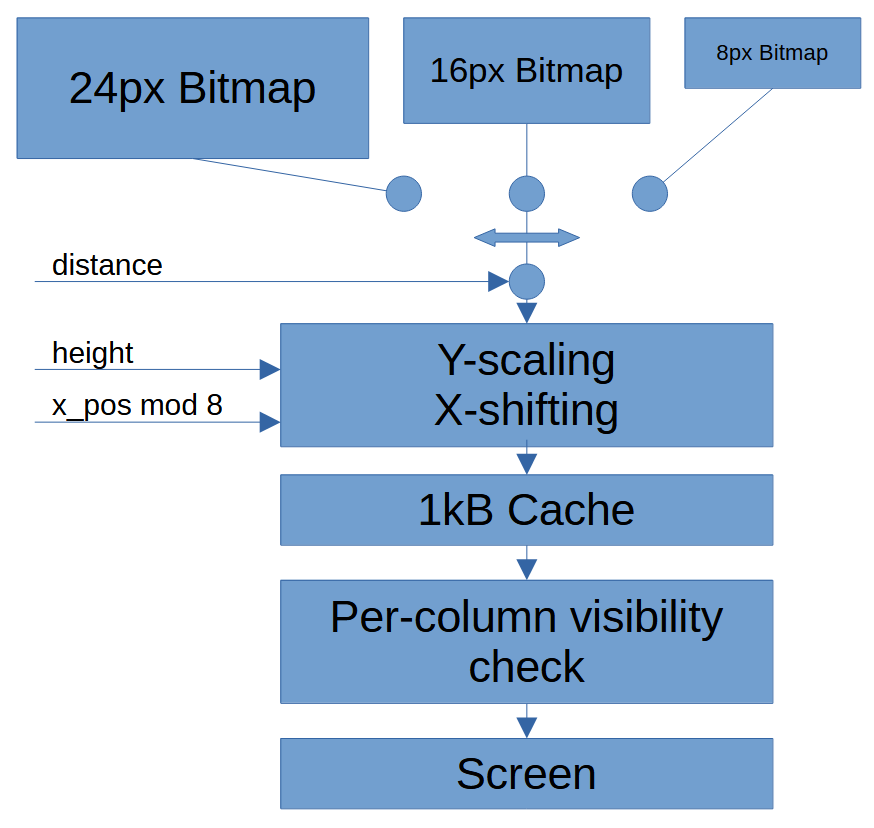
Some objects (like ghosts) exist in multiple fixed widths:
-
8 px
-
16 px
-
24 px
These act like manual mipmaps.
Which sprite is chosen depends on distance. Vertical scaling is still dynamic, but horizontal scaling becomes a simple sprite selection.
This saves both memory and CPU time — and looks surprisingly good in motion.
Vertical scaling can remove line or insert line twice. It distorts the sprite, and after experimenting with it I found out that it looks good only if the sprites are not too much detailed. The details tend to look badly after scaling.
I actually received some of the best sprite set of dragon from various angles, very detailed and simply beautiful - from a person that just liked what I was working on.
Just that when scaling was added, end result was not good, sadly.
Sprite X shifting
To locate a sprite with per-pixel precision, its bitmap has to be shifted by up to 7 bits.
Or up to 4 - if we can do both left and right shifting.
|
srl c rr d rr e rra |
| Code 1. Rigth-shfit 24px sprite by 1 pixel. Can be executed up to 4 times to push the sprite to the correct position. |
This is actually quite expensive.
And there are separate scaler-shifter functions for each of sizes: 8px and 16/24px wide sprites.
Sprite Caching: Pay Once, Reuse Forever
Sprites go through two stages:
-
Y-scaling + X-shift into a sprite cache
-
Blitting from cache to screen
If a sprite hasn’t changed size or sub-pixel position, it is reused directly from cache. Sprite cache is quite large - 1kB, but it only allows to store 4 sprites. Cache thus only partially reduces the pain.
Fireballs benefit the most from this, since their appearance is stable across frames. And they have their own cache - 128 bytes, 8 entries.
This turns repeated expensive operations into cheap memory copies.
Movement Is the Real CPU Hog
Ironically, drawing objects is not the biggest cost.
Movement is.
Collision detection, interaction checks, and state updates consume a large chunk of frame time — especially with many active entities.
It is surprisingly hard to add a 8 bit value to 16 bit one and check if the object is not hitting the wall - or another object, for up to 17 objects per frame.
This part of code is actually the best optimized one in World of Spells, second only to renderer. Number of 17 objects that control code has to check every frame is not much smaller than 32 columns.
Some may say it is hard to do fast raycasting on 8 bit micro. That is true.
Making bullet-hell FPS adds another dimension to it.
To control this:
-
Objects that fail to move enter a sleep state
-
Sleeping objects are only tested once every 17 framesif they shall wake up
-
This dramatically reduces useless collision checks - when the ghosts sleeps, but does not help much in open arenas
Collision is only possible when two objects share same position on map.
Fireballs bouncing off mirrors are handled here too — without touching the raycaster.
Why This Works
The object system works fast because:
-
Object count is hard-limited
-
Sorting is approximate, not perfect
-
Most objects are rejected early
-
Rendering only runs when absolutely necessary
-
Visual correctness is good enough, not mathematically perfect
This is not a general-purpose object engine.
It is an engine designed to support exactly the gameplay World of Spells needs — and nothing more.
Leave a comment
Log in with itch.io to leave a comment.